 PVA
Guide / Chapter 9
Camera Pane
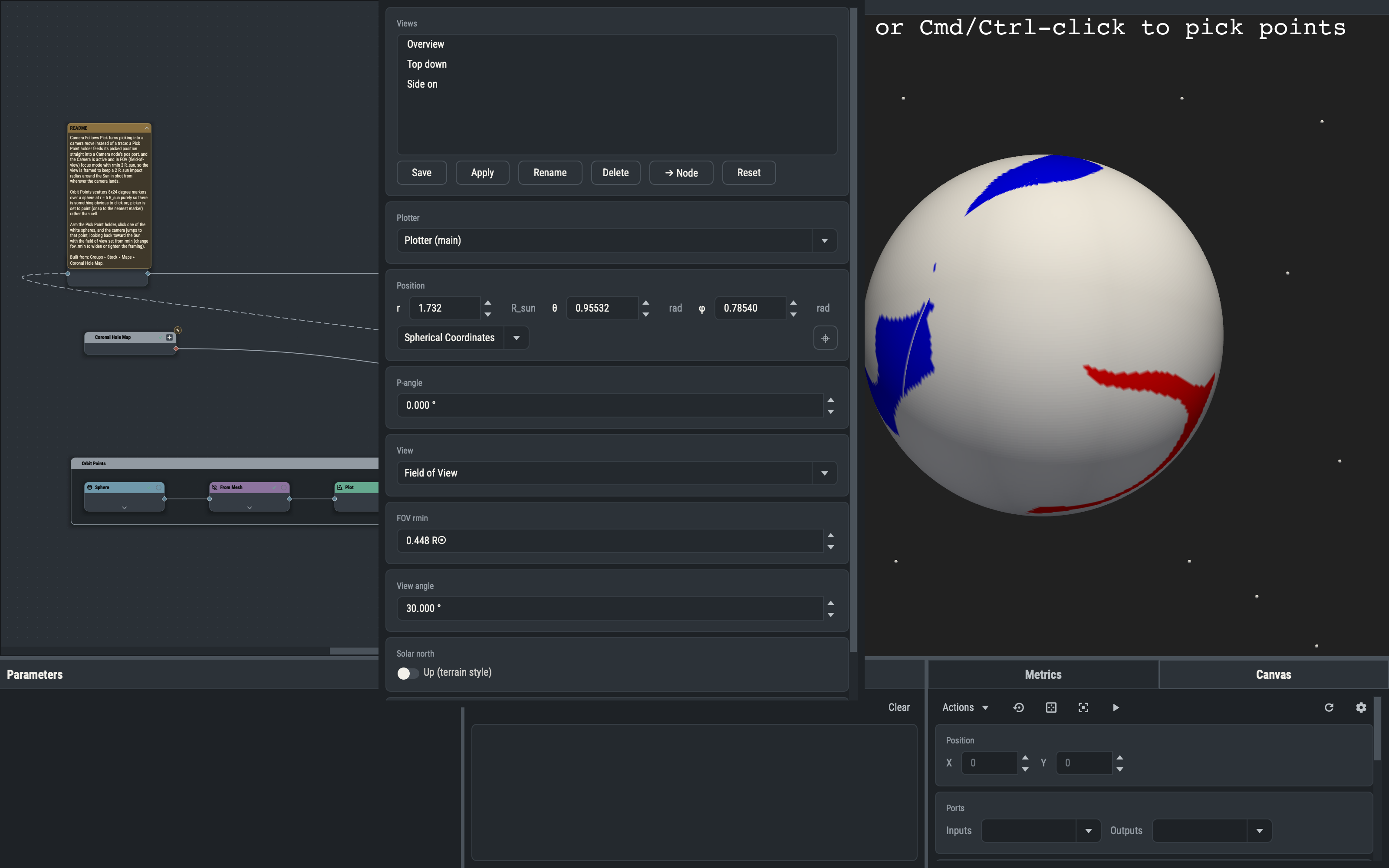
The Camera pane shows and edits a Plotter’s camera pose in observer (spherical) coordinates, chooses how the view is specified and saves, recalls and promotes named camera views. The fields track the live camera, so orbiting, panning or zooming in the viewport refills them at once, and every edit applies to the viewport at once.
Plotter selector
The Plotter combo lists every Plotter node, the main Plotter first. Selecting a Plotter node on the canvas moves the combo to it; choosing another Plotter rebinds the pane to its viewport and refills every field from its camera.
The pane remembers three settings per Plotter: the View mode, the Solar north switch and the Scroll wheel switch. The memory is saved in the session (see Sessions).
Position
The Position card edits where the camera sits. A frame combo chooses how the point is expressed: Cartesian (x, y, z), Spherical (r, θ, φ, the default) or Longitude-Latitude (r, lat, lon). Per-component unit buttons default to the Length and Angle unit settings (see Settings). The frame and units are display choices: the pose is always stored and applied as (r, θ, φ) in solar radii and radians, so changing either re-expresses the same point and never moves the camera (see Display frames and units for vectors).
Pick from the 3-D view
The ⌖ button fills the whole row from the viewport. Click it, then pick in the 3-D view of the chosen Plotter (right-click or CtrlLeft-click). The pick is one-shot and fill-only, and the last ⌖ button pressed wins (see Interactivity).
View modes
The View combo chooses how the focal point and extent are specified. P-angle is the camera’s roll about the line of sight relative to solar north. The Camera node offers the same three modes (see Camera).
| Mode | Meaning | Card |
|---|---|---|
| Field of View | A square view looking at the Sun that just contains a circle of impact radius rmin. | FOV rmin |
| Line of Sight | A view along the line of sight, given as a rectangle of angular extents on the plane of the sky. | LOS view |
| Explicit Focus | The focal point given directly, with the same frame and ⌖ options as Position. | Focus |
In Line of Sight mode the four fields are x0, x1, y0, y1: the window sets the view angle to |y1 - y0| and the ratio of the extents is the aspect ratio. In Field of View mode the view is square and rmin must be smaller than the camera’s distance from the Sun. Both modes letterbox the viewport to their aspect (see Letterbox).
View angle
The View angle field shows the camera’s actual vertical view angle and is editable in every mode. It belongs to the pane only, not to the Camera node, and it is linked both ways to the mode’s own row:
| Mode | Editing View angle | Editing the mode’s row |
|---|---|---|
| Explicit Focus | Applies directly to the camera. | No coupled row. |
| Line of Sight | The window rescales about its center to that height, x scaled by the current aspect. | Editing y0 or y1 rewrites View angle. |
| Field of View | rmin becomes d * sin(angle / 2), with d the observer distance. | Editing rmin rewrites View angle. |
Solar north
The Up (terrain style) switch makes solar north the camera’s up direction, holds the P-angle at 0 and gives the viewport a terrain interaction style that keeps solar north up instead of the free trackball. It has no effect on an RTP Plotter.
Scroll wheel
With Scroll zooms view angle off (the default), the wheel dollies the camera toward or away from the focus. On, the wheel changes the view angle with the position fixed, and the angle fields refill as you scroll.
Reset
Reset fits the camera to the visible scene and refills the pane. It replaces the viewport’s r key, which PVA suppresses (see Viewports). It does not clear a letterbox.
Saved camera views
The Views card keeps a global, ordered list of named camera views, shared by every Plotter and every session. Each view stores the viewport’s raw camera pose, the View mode, the Solar north switch and the armed letterbox. The Animate editor’s Camera selector uses the same list (see Animations).
Save names the bound viewport’s current state and stores it. Apply replays the selected view onto the bound Plotter, restoring its View mode and Solar north switch; on an RTP Plotter only the raw pose is replayed. Rename edits inline, and Delete needs a second press to confirm. → Node applies the view, then adds a Camera node seeded from the now-live camera.
Double-clicking a row also applies the view. Names are unique.
→ Node promotes a view to the graph: a Camera node is added to the left of the targeted Plotter and connected to its scene port. It becomes the Plotter’s only active view, since any other active Camera node feeding that Plotter is switched off, and the step is one undo entry.
While a 3-D viewport has the keyboard focus, a bare digit 1 to 9 applies the matching saved view, counted from one in list order. A digit past the end does nothing but is still consumed, so it never reaches the viewport or a macro.
The list lives in camera-views.yaml in the user-settings folder of the PVA home (see Files and Folders), an ordered list of entries with name, camera, view, solar_north and letterbox. A missing or unreadable file yields an empty list; malformed entries are dropped.
Errors
A rejected edit never reaches the viewport. A red inline label appears below the View angle card instead, and the next successful apply clears it. Causes include an rmin not smaller than the observer distance, a camera exactly over a solar pole (the view direction is then parallel to solar north and the P-angle is undefined) and, in Explicit Focus, a focal point at the camera position.
RTP Plotter limits
An RTP Plotter draws values as raw x, y, z with no solar geometry (see The Plotter). For its viewport the pane disables the controls that need solar-frame geometry: the frame combos and unit buttons (rows show the raw stored (r, θ, φ)), the View combo and its cards, Solar north and P-angle. View is forced to Explicit Focus and Solar north to off. Position, Focus, View angle, the ⌖ buttons, Scroll wheel, Reset and the Views card stay available.