 PVA
Guide / Chapter 7
Sessions
A session is the document: the whole working state of PVA saved in one .pyv file, a recipe of nodes, edges, parameters, groups, notes, macros, animations and viewport cameras, never the computed data. That keeps a file small, readable and diffable, and saving, loading and saving again produces an identical file.
Saving and opening
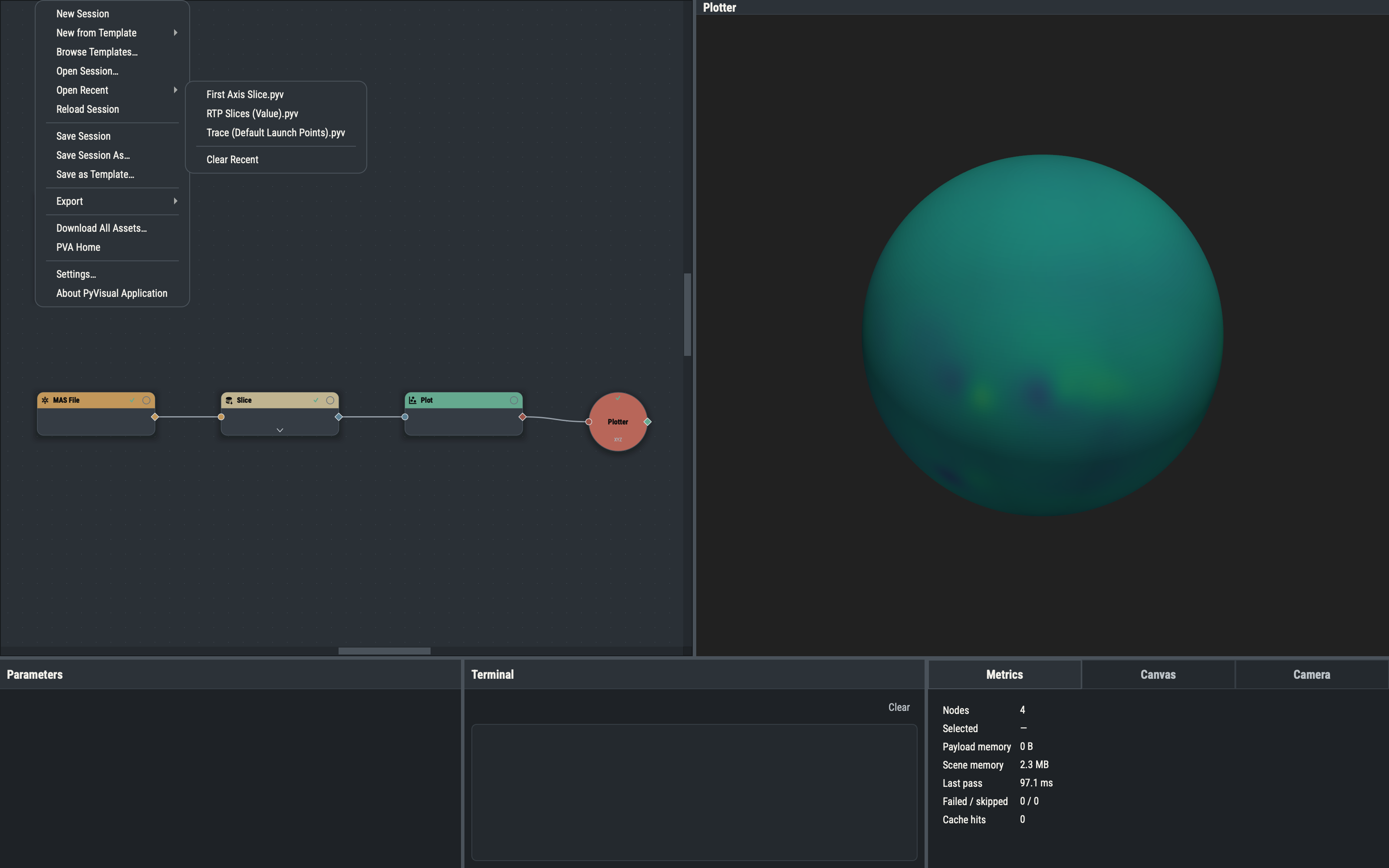
Save Session As… and Open Session… start in the sessions folder of the PVA home, and .pyv is appended when missing. A successful save makes that file the session’s current file, updates the window title (PVA — <file name>, or untitled) and adds it to Open Recent. Open Recent keeps the ten most recent sessions, hides files that no longer exist, and lives in recent.yaml (Files and Folders).
Opening a session replaces the whole graph. Node ids, positions, titles, parameters, locks, port sides, link routes, groups, notes, macros, animations, the active Camera, the main Plotter and each viewport’s camera pose, view mode, solar north, letterbox and wheel mode are restored exactly. Nodes start unevaluated and a full pass is requested after the load. A load that fails (a malformed file, an unknown node type or a version mismatch) changes nothing and reports the reason in the Terminal. The undo history starts empty after every load and after New Session.
Custom opacity functions embedded in the file are registered for the session, and any whose names your library lacks are added to it. A function already in your library wins over an embedded copy of the same name. Custom colormaps the file references are handled the same way, and the Terminal logs imported colormaps: … for any added to your library.
The session file
A .pyv file is plain YAML restricted to ordinary scalars, lists and maps. A parameter missing from a node entry loads as its default; a parameter you blanked, whose default is not blank, is saved as an explicit null so it stays blank. The top-level keys are:
| Key | Content |
|---|---|
version | The file format version. |
nodes | Every node: id, type, title, position, port sides (the role defaults plus any per-port overrides), exposed and pinned ports, parameter values, locks, symmetric flags, display frames and units, cache policy, and a sidecar name when it has captured state. |
edges | Source, destination, destination port and, for component and event edges, the component or source port. An edge may also carry an optional route, a list of [x, y] scene points through which an angled link is drawn. |
groups | The group tree: id, name, members, collapsed state, parent and port sides (Groups). |
notes | Free notes and notes hosted on a node or group. |
macros | The macros of Macros. |
animations | The animations of the Animate editor (Animations). |
viewports | Each Plotter viewport’s camera pose and view settings. |
opacity_functions | The custom opacity functions the Plots use, each with name, points and interp. Always written, empty when unused. |
colormaps | The custom colormaps the nodes’ colormap rows use, each with name, stops (position and #rrggbb color pairs) and interp. Always written, empty when unused. |
camera | The id of the active Camera node, or null. |
plotter | The id of the main Plotter node, or null. |
State sidecars
Most nodes are pure recipes, but a Snapshot is its captured payload, an Accumulator is its list of entries, and an event holder (Pick Point, Pick Mesh, Track Camera) that has fired is its last payload. Their state goes to node-<id>.npz in a <session>.data folder beside the .pyv, and the node entry references it by a relative path. Keep the file and its .data folder together when you move or share a session.
Unsaved changes
PVA compares the session content with its last saved or loaded state. View-only changes (canvas pan and zoom, pane layout, a viewport’s camera) do not count. New Session, New from Template, Open Session and Open Recent ask before replacing a modified session: Save (the default) saves first and continues only if the save succeeds, Discard continues, and Cancel stops. Quitting does not ask about unsaved session changes; the only quit-time prompt is for unsaved edits in the Settings window. Save before you quit.
Reloading
File ▸ Reload Session (CtrlAltR) and the refresh button at the right end of the Canvas pane re-read the current session file, which picks up a save made elsewhere. Both are disabled while the session has no file. When the session has unsaved changes the Save / Discard / Cancel prompt appears first; turn off Confirm before reloading a session in Settings ▸ Defaults ▸ Editing to reload immediately.
Opening files at launch
PVA can start with a file given on the command line, dropped on the running application or double-clicked in the file manager. Paths that start with a dash or do not exist are ignored.
| File | What happens |
|---|---|
.pyv | Opens as a session, like Open Recent; the unsaved-changes prompt applies when a session is already open. |
.hdf or .h5 | Opens a new untitled session from the First Axis Slice template with its MAS File node pointed at the file (Templates). |
| Anything else | One Terminal warning (unrecognized file type or file not found); nothing else happens. |
.hdf5 is not recognized. The macOS and Linux builds register .pyv and HDF files with the system (on macOS, use Open With for HDF). To render a session without the window, see Headless Rendering.
Version compatibility
Sessions, templates and group templates record the file format version as major.minor.patch. A file loads when its major number matches the format’s and its minor number is equal or older; the patch number is ignored. A file with a newer minor version, or from another major version, is refused with a message that reads session file <path> is version 1.9.0; this application (file format 1.8.0) reads 1.x files up to 1.8.x (a newer file needs a newer PVA), with the file’s kind (template for a group template), its path and both versions filled in. Keys added in later versions are optional and take their defaults when absent, and keys a version does not know are ignored, so older files open without conversion. To open a file from a newer version, update PVA.