 PVA
Guide / Chapter 20
Macros
A macro binds one gesture, a key combination or a wheel notch, to one action on one node parameter: increment an opacity, toggle a switch, step through a choice list, slide a range window. While Macro Mode is on and a 3-D viewport has the keyboard focus, the gesture performs the action, so you can scrub a value while watching the viewport.
Macro Mode
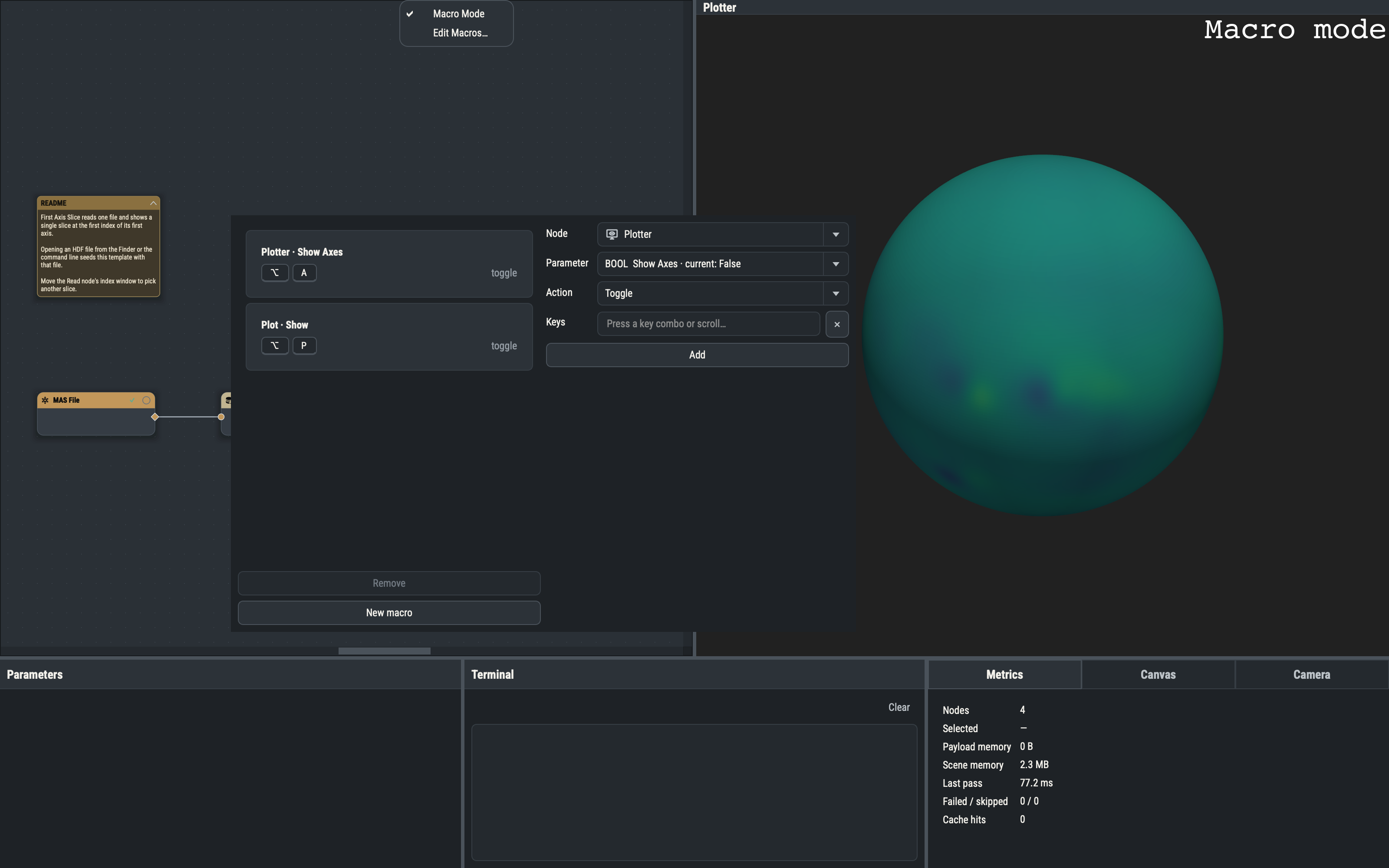
The Macros menu has two entries: Macro Mode (CtrlM), a checkable toggle, and Edit Macros… (CtrlShiftM). Macro Mode is off at every launch and is not saved in the session. While it is on, Macro mode appears in the corner of every 3-D viewport, and a gesture that matches a macro is consumed by it and goes no further. If Macro Mode is off or nothing is bound to the gesture, the event passes through untouched.
The viewport-focus rule
A macro fires only when the key press or wheel event is aimed at a 3-D viewport, main or extra, docked or floating. Click in the viewport first so it has the keyboard focus. With focus anywhere else (the canvas, the Parameters pane, a text field, a dialog), the same keys do their ordinary job, so a macro can safely use a bare key such as F5.
Building macros
Edit Macros… opens a non-modal window with the macro list on the left and a builder on the right. Each card names its node and parameter (plus the component for a vector) and shows the gesture and action. A card whose stored gesture has since become reserved is marked (reserved): it is kept, but the reserved binding wins until you change the gesture.
The builder takes a Node (selecting one node on the canvas preselects it), a Parameter that has at least one action, an Action, an Amount where the action takes one, a Component for vectors and the gesture. To record the gesture, focus the Keys field and press the combination or scroll over it. The builder enforces these rules and shows the reason for a rejection:
- A gesture is bound to at most one macro in a session.
- The action must be valid for the parameter’s kind.
- An amount is required for amount actions, and whole for integer and integer-window parameters.
- A component is required for vector parameters and refused for others.
Removing a node removes every macro that targets it.
Actions
| Parameter kind | Actions |
|---|---|
| Integer, float, date-time | Increment, Decrement (amount; seconds for date-time) |
| Vector, integer vector | Increment, Decrement (amount; one component per macro; whole-number amounts for an integer vector) |
| Numeric choice | Increment, Decrement (amount), Next, Previous |
| Boolean | Toggle, On, Off |
| Choice | Next, Previous |
| Button | Trigger |
| Float or integer window | Shift Up, Shift Down, Widen, Narrow (amount) |
The semantics are fixed:
- Increment / Decrement add or subtract the amount and clamp to the parameter’s bounds; integers are rounded. On a numeric choice they are refused while it holds a named choice.
- Next / Previous move through a choice list and wrap at either end. If the current value is not in the list, Next picks the first entry and Previous the last.
- Shift Up / Shift Down slide a window by the amount, keeping its width; a window that would pass a bound is moved back inside it. Widen moves each end outward and clamps, Narrow moves each inward and is refused if the ends would cross. A symmetric range cannot be shifted, a width-locked one cannot be widened or narrowed, and on a symmetric range only the low end steps while the high end mirrors it.
- Trigger presses a button parameter, as clicking it in the Parameter Pane does.
Holding a key repeats it, but only amount actions honor the repeat, so holding scrubs the value; Toggle, On, Off, Next, Previous and Trigger fire once per press. A burst of repeats on one parameter is one undo step.
A firing that leaves the value unchanged does nothing and triggers no re-evaluation. One that cannot be performed (a parameter fed by a port, a missing node, a narrow that would cross) logs an error to the Terminal and still consumes the key. A successful write behaves like a Parameters pane edit: the pane updates and an evaluation pass is requested.
Gestures
A gesture is a key combination or a wheel notch, each with optional modifiers. Key combinations use the portable spelling (Shift+Up, Ctrl+Alt+K, F5); on macOS Ctrl stands for Command and Meta for Control. Wheel gestures are Wheel Up and Wheel Down, and a trackpad scroll counts by direction. A plain wheel notch always zooms the camera, so a wheel macro needs at least one modifier, for example Shift+Wheel Up.
Reserved gestures
The builder refuses a gesture that is empty, that is already a window shortcut (see Shortcuts), that is Ctrl/Command plus a digit (reserved for pick chords), that is a bare digit 1 to 9 (they recall saved camera views) or that is one of the viewport’s built-in bindings (see Mouse and key bindings). Right-click and CtrlLeft-click picks are reserved too. Variants with other modifiers are free: ShiftUp is a good scrub key, since plain Up zooms.
Storing macros
Macros live in the session under a macros list, each entry holding an id, the target node and parameter, the action, the gesture and the amount and component where they apply. They need no separate file, and they enter the undo history only through the parameter changes they make (see Sessions). Animations drive the same parameters over a frame sequence instead of interactively.