 PVA
Guide / Chapter 8
Parameter Pane
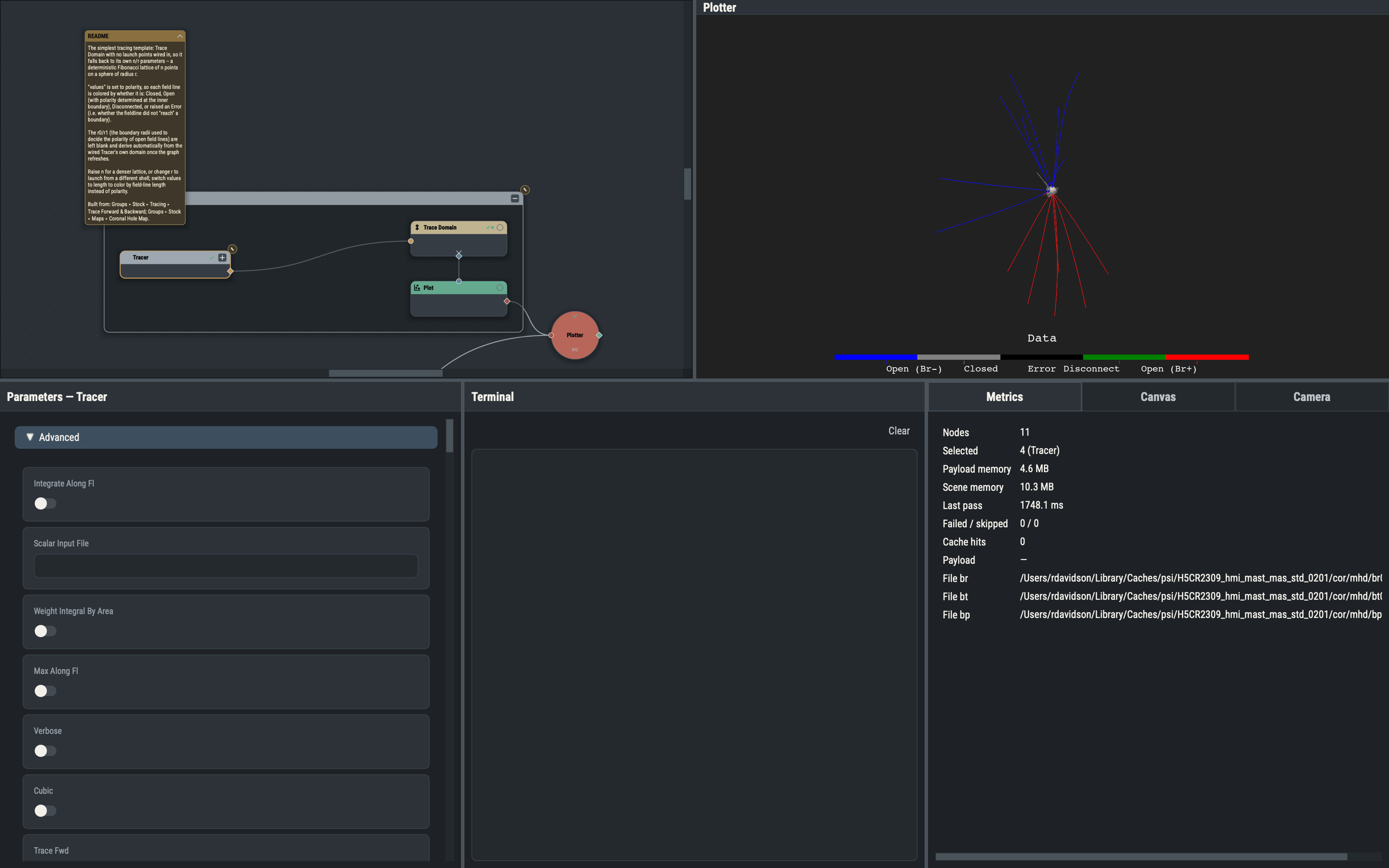
The Parameters pane is one generic form for the selected node or group. Every node uses the same form, so a node never needs a bespoke editor: each parameter is a card whose editor depends on the parameter’s kind, and the form shows only the rows that apply under the other parameters’ current values.
What each selection shows
With nothing selected the pane is empty. With one node it shows that node’s form (a Snapshot, which has no parameters, shows only a note). With several nodes it shows only a count in the title; act on the selection from the Actions menu on the canvas. A read-only note appears above the form when a node’s ranges and choices depend on upstream data that has not been evaluated yet: the editors work, but bounds and choice lists may still tighten after upstream evaluates.
Rows that do not apply are hidden, and the form rebuilds when that changes, for example when a mode dropdown changes which fields matter. Rows a node exposes beyond its declared parameters appear in a collapsed Advanced section.
Editors
Integers and floats use spin boxes with the parameter’s bounds, vectors one spin box per component (integer vectors use integer spin boxes with no decimals, and no display frame or unit menus), booleans a switch, text a line edit, choices a dropdown and multi-choices a filterable checklist. Paths, filename patterns, string lists, colors and colormaps have their own pickers. A Button parameter triggers the node’s action, such as an Exporter’s export, and the Exporter’s Auto Export switch writes without a press whenever a pass begins with the node dirty. Spin boxes, dropdowns and sliders step on the mouse wheel only while Ctrl is held, so a wheel never edits a value by accident.
Two editors have behavior worth knowing. A range has a low and a high field plus two toggles: lock, where the high end follows the low at a constant width, and symmetric, where the pair mirrors about zero (hidden when the minimum is zero or above). If exactly one end is blank and the parameter has an automatic default, the default fills the blank end; otherwise nothing is committed and the card hints that every field must be entered. A number or choice field accepts a number or one of a fixed set of names; a Plot’s opacity field also accepts @name, a custom opacity function.
Custom opacity functions and colormaps
A Plot’s opacity row and colormap rows open modal editors for custom @name opacity functions and colormaps. The editors are covered in the Plot Node chapter, under Custom opacity functions and Custom colormaps.
Vectors and display frames
Position-like vector rows have a frame dropdown (Cartesian, Spherical, Longitude-Latitude) and a unit menu per component. These change only how the value is displayed and entered, never the stored value; see Display frames and units for vectors.
Pick from the 3-D view
Rows that can be filled from the viewport show a ⌖ button. Pressing it arms a one-shot pick: the next qualifying pick writes its result into that parameter. See Interactivity.
Captions and provenance
Many rows can take an automatic default derived from upstream data. The editor shows the effective value (yours, or else the derived default as a placeholder), and a caption at the right says where it comes from:
| Caption | Meaning |
|---|---|
auto | The row is blank and its value is derived automatically. |
port | The row has an input port (added with ⊕) but nothing is connected. |
linked | An edge feeds the row; the value arrives from upstream and is not editable here. |
linked takes precedence over port, and both over auto. Beside the caption, the reset button ↺ clears your value so the row returns to its derived default; it shows only when the row has a derived default, holds a value of yours and is not linked.
Parameter ports
A parameter that can be driven from another node has a port that is absent from the card until you add it with the ⊕ button on its row; ⊖ removes it and any edge connected to it. A row whose port is connected is disabled, because the value comes from the edge. When one port drives several parameters, such as a Tracer’s launch points, the form shows one group card whose header lists the parameters it covers and carries the button. The concept is explained in Nodes.
Optional ports
Below the cards, a node with quiet optional ports shows an Optional ports heading and one card per port. These ports drive no parameter; Nodes explains when they are drawn. ⊕ pins a port visible whatever the other parameters say, and ⊖ hides it again, removing any edge into it. A pinned port is saved in sessions, templates and saved groups.
Inline errors and editing
An invalid value is never reported in a dialog. The editor rejects it, the previous value stays in effect, and a red hint under the editor gives the reason; the hint clears on the next successful edit of that row. Failures during evaluation appear in the Terminal Pane and as an error badge on the node.
An edit commits when the field loses focus or you press Return, and takes effect at once: the node becomes dirty and re-evaluates if Auto execution is on. Consecutive edits to one parameter merge into one undo step.
Group selection
Selecting exactly the members of a group shows a group summary instead of a form: a name field to rename the group, and a caption with the member count. The Canvas pane’s position and port-side controls then act on the group as a unit (Groups).