 PVA
Guide / Chapter 18
Settings
The Settings window holds every user preference on four pages: Defaults (the values nodes, capture and evaluation consult), Style (the look of the window and canvas), Plotter (the look of the 3-D viewports) and Shortcuts (a read-only key list). Edits are buffered and saved explicitly, and each page is backed by one file in the user-settings folder (see Files and Folders).
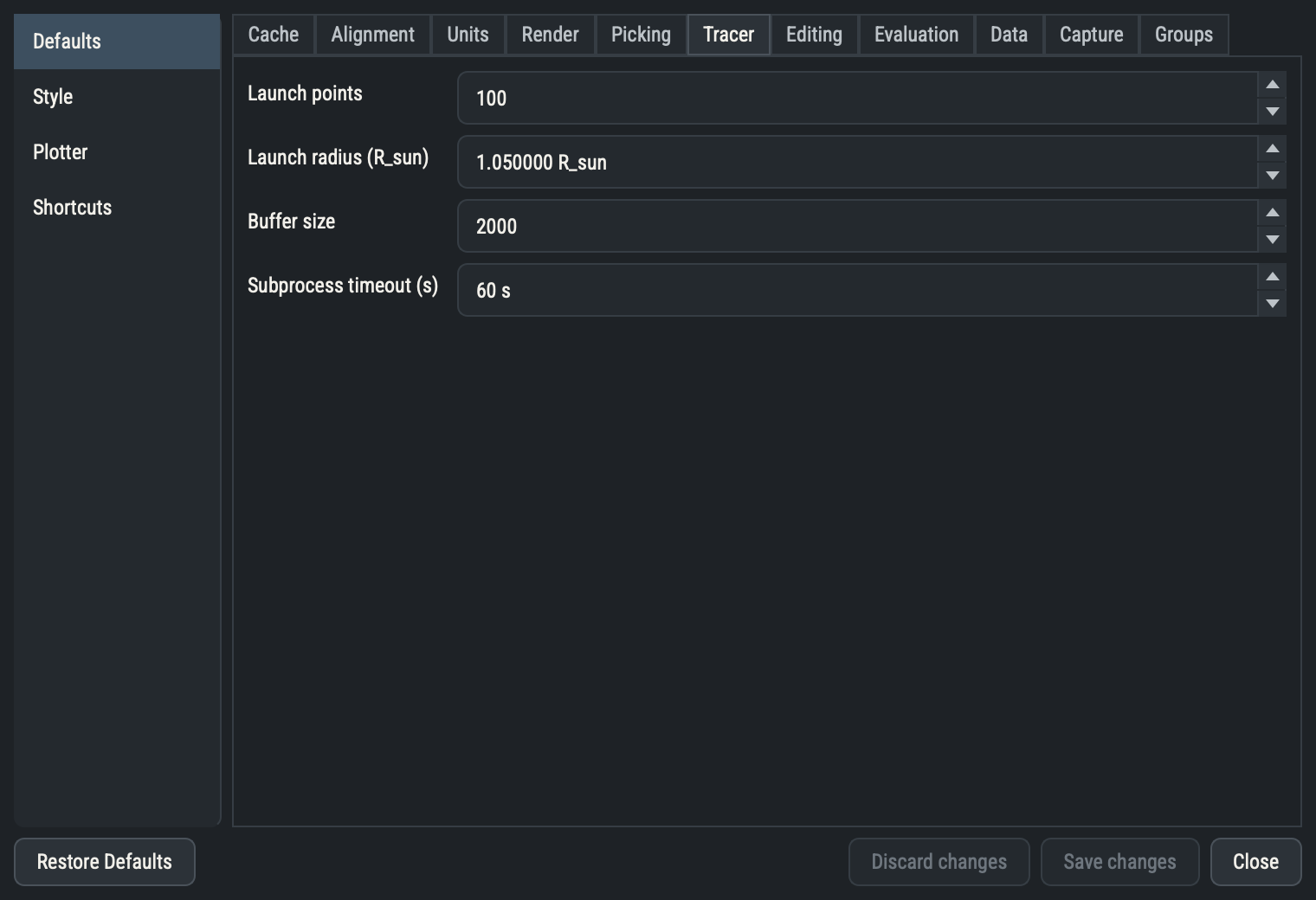
Choose File ▸ Settings… or press ⌘, / Ctrl+,. The window is non-modal, so the canvas stays usable, and there is only ever one.
Buffered editing
Every field on the Defaults, Style and Plotter pages stages its edit; nothing is written until you press Save changes. A value that fails validation shows a red message under the field and the editor returns to its last good value, with no dialog. Setting a field back to its saved value removes it from the pending edits. Discard changes reverts every pending edit on every page, Restore Defaults stages the shipped value for every key on the current page, and Close closes the window.
Closing the window or quitting with edits pending asks whether to save, discard or cancel. Some Style entries (the Window tab) apply only at startup: they save like any other value, and saving one shows a restart notice listing them. The Groups tab is never pending, since its renames and deletes apply on disk at once.
Defaults page
The Defaults page is stored in settings.yaml. Unknown keys are ignored. A file that cannot be read, or that holds a wrongly typed or out-of-range value, makes PVA start with defaults and print a one-line message in the Terminal.
Each table lists the field label as shown, the stored key, the editor kind, the default, the permitted range or choices and what the setting does. A setting marked new nodes only is read once, when a node is created, to seed its parameters; changing it never alters existing nodes. Every other setting is read live at evaluation, validation or display time.
Cache
The automatic caching rule for node results; see Caching.
| Setting | Key | Kind | Default | Range | Description |
|---|---|---|---|---|---|
| Auto-cache threshold | cache.threshold | float | 0.1 s | ≥ 0 | Evaluation-time duration that triggers auto caching. |
Alignment
| Setting | Key | Kind | Default | Range | Description |
|---|---|---|---|---|---|
| Alignment tolerance | align.rtol | float | 0.00001 | ≥ 0 | Relative tolerance for scale-alignment comparisons, floored at that fraction of one grid spacing. |
Units
How lengths and angles display in the Parameters and Camera panes. Stored values and computation are unaffected.
| Setting | Key | Kind | Default | Range | Description |
|---|---|---|---|---|---|
| Length unit | units.length | choice | R_sun | R_sun | AU | km | Preferred display length unit. |
| Angle unit | units.angle | choice | deg | deg | rad | Preferred display angle unit. |
Render
New Plot nodes are seeded with the colormap and opacity listed here.
| Setting | Key | Kind | Default | Range | Description |
|---|---|---|---|---|---|
| Colormapnew nodes only | render.colormap | colormap | viridis | Default colormap seeded into new Plot nodes. | |
| Opacitynew nodes only | render.opacity | float | 1 | 0 to 1 | Default opacity seeded into new Plot nodes. |
| Dim stale meshes | render.dim_stale | bool | off | Lower a Plot's viewport opacity while it awaits re-evaluation. |
Picking
| Setting | Key | Kind | Default | Range | Description |
|---|---|---|---|---|---|
| Picker | picking.picker | choice | point | point | cell | hardware | Picker used by the ⌖ one-shot parameter pick. |
| Tolerance | picking.tolerance | float | 0.025 | 0 to 1 | Pick tolerance as a fraction of the window diagonal (⌖ pick). |
Tracer
Seeds for trace nodes, plus the live timeout for the tracing subprocess.
| Setting | Key | Kind | Default | Range | Description |
|---|---|---|---|---|---|
| Launch pointsnew nodes only | tracer.n | int | 100 | 1 to 100000 | Default launch-point count seeded into new trace nodes. |
| Launch radiusnew nodes only | tracer.r | float | 1.05 R_sun | ≥ 1 | Default launch radius seeded into new trace nodes. |
| Buffer sizenew nodes only | tracer.buffer_size | int | 2000 | ≥ 10 | Default trace buffer size seeded into new trace nodes. |
| Subprocess timeout | tracer.timeout | float | 60 s | ≥ 1 | Seconds to wait for the mapfl tracing subprocess to answer before a trace fails; read live, applies to the next trace. |
Editing
| Setting | Key | Kind | Default | Range | Description |
|---|---|---|---|---|---|
| Undo history depth | editing.undo_depth | int | 100 | 1 to 1000 | Maximum number of undo/redo steps kept per session. |
| Confirm before reloading a session | editing.confirm_reload | bool | on | Ask to save or discard unsaved changes before Reload Session re-reads the file; off reloads immediately. |
Evaluation
| Setting | Key | Kind | Default | Range | Description |
|---|---|---|---|---|---|
| Slow computation warning | evaluation.slow_warning | float | 3 s | ≥ 0 | Seconds a single node computation may run before the terminal logs a warning naming it; 0 disables. |
Data
| Setting | Key | Kind | Default | Range | Description |
|---|---|---|---|---|---|
| Data folder | data.directory | directory | (empty) | Where a Reader node's psi-data-utils source saves fetched sample files; blank uses psi-data-utils' own cache. | |
| Exports folder | data.export_directory | directory | (empty) | Where an Exporter's 'cache' destination writes files; blank uses the PVA home's cache/exports folder. |
Capture
Screenshot and animation output; see Screenshots and Animations. Headless Rendering also uses the jobs and ffmpeg settings.
| Setting | Key | Kind | Default | Range | Description |
|---|---|---|---|---|---|
| Screenshots folder | capture.directory | directory | (empty) | Where Screenshot saves screenshots; blank uses the PVA home's screenshots folder. | |
| Scale | capture.scale | int | 1 | 1 to 4 | Screenshot resolution multiplier over the on-screen viewport size. |
| Transparent background | capture.transparent | choice | no | no | yes | Save the screenshot with a transparent background. |
| ffmpeg path | capture.ffmpeg | str | (empty) | Path to the ffmpeg executable used to assemble animations; blank uses the ffmpeg shipped inside the app, else imageio-ffmpeg's, else the one on PATH. | |
| Animation render workers | capture.jobs | int | 0 | 0 to 64 | Worker processes used to render animation frames; 0 uses half the machine's CPU count. The count is always capped by available memory measured on the first frame. |
Groups
The Groups tab manages group templates: Saved groups (rename, delete and star your own) and Stock groups (read-only, with stars). See Groups.
Style page
The Style page edits the application’s own look: fonts, colors, canvas, layout and window geometry. The Fonts tab also holds Scale, a multiplier from 0.5 to 3 on every widget font (pane headers, parameter labels, captions, the Terminal and value tables) but not on canvas cards, which follow the canvas zoom instead. View ▸ Font Size ▸ Larger and Smaller (CtrlAlt= and CtrlAlt-) step it by 0.1 and Reset restores the default; those three write style.toml at once and refresh the window without the Save changes step. The Canvas tab also holds the default link style; the dot grid and snapping switches live on the Canvas pane’s Grid card instead (Snapping to the grid). It is stored in style.toml, rewritten in full on every save, so hand-added comments are lost. Entries not marked startup-only apply to the running window when you save, and Restore Defaults stages the shipped value of every style key, including keys the page does not show. The evaluation animation (the [feedback] table) has no field here and is edited only in the file (see Status badges).
Plotter page
The Plotter page edits a curated subset of the pyvista theme that every 3-D viewport and every headless render uses. Only values that differ from the shipped theme are written, to the [theme] table of plotter.toml; delete a line, or the whole file, to restore the shipped value. Saving applies the theme to every live viewport and re-renders every Plot at once, with no restart.
Colors
| Setting | Key | Kind | Default | Range | Description |
|---|---|---|---|---|---|
| Background | background | color | #212121 | The viewport's background color. | |
| Mesh color | color | color | #ffffff | Solid fallback mesh color, applied when a Plot's own Solid color is blank. | |
| Colormap | cmap | colormap | rainbow | Default colormap, applied when a Plot's own Colormap is blank. | |
| Edge color | edge_color | color | #000000 | Mesh edge color. | |
| Outline color | outline_color | color | #000000 | Bounding-box outline color. | |
| NaN color | nan_color | color | #a9a9a9 | Color for masked / NaN values. | |
| Above-range color | above_range_color | color | #808080 | Color for values above the color limits. | |
| Below-range color | below_range_color | color | #808080 | Color for values below the color limits. |
Text
| Setting | Key | Kind | Default | Range | Description |
|---|---|---|---|---|---|
| Font family | font.family | choice | courier | arial | courier | times | Scalar-bar and orientation-axes caption font. |
| Text size | font.size | int | 12 | 4 to 72 | General viewport text size. |
| Title size | font.title_size | int | 14 | 4 to 72 | Scalar-bar title text size. |
| Label size | font.label_size | int | 11 | 4 to 72 | Scalar-bar label text size. |
| Text color | font.color | color | #ffffff | Viewport text color. |
Rendering
| Setting | Key | Kind | Default | Range | Description |
|---|---|---|---|---|---|
| Line width | line_width | float | 1 | ≥ 0 | Default line width. |
| Point size | point_size | float | 5 | ≥ 0 | Default point size. |
| Lighting | lighting | bool | on | Scene lighting. | |
| Smooth shading | smooth_shading | bool | off | Smooth (Phong) shading. | |
| Anti-aliasing | anti_aliasing | choice | msaa | none | ssaa | msaa | fxaa | Anti-aliasing mode. |
| Multi-samples | multi_samples | int | 8 | 0 to 16 | MSAA/SSAA sample count. |
| Interpolate before map | interpolate_before_map | bool | on | Interpolate scalars before mapping to colors. | |
| Split sharp edges | split_sharp_edges | bool | off | Split sharp mesh edges for crisper shading. | |
| Sharp-edge feature angle | sharp_edges_feature_angle | float | 30 | 0 to 180 | The feature angle (degrees) above which an edge is sharp. |
| Volume mapper | volume_mapper | choice | smart | smart | gpu | fixed_point | open_gl | Volume rendering mapper for dataset(volume) actors. |
Axes
| Setting | Key | Kind | Default | Range | Description |
|---|---|---|---|---|---|
| Show axes | axes.show | bool | on | Theme default for new plotters; a Plotter node's own Show Axes parameter still wins per plotter. | |
| Axes box | axes.box | bool | off | Draw the orientation axes as a box. | |
| X axis color | axes.x_color | color | #22004f | Orientation-axes X color. | |
| Y axis color | axes.y_color | color | #810022 | Orientation-axes Y color. | |
| Z axis color | axes.z_color | color | #ffffff | Orientation-axes Z color. |
Colorbar
| Setting | Key | Kind | Default | Range | Description |
|---|---|---|---|---|---|
| Orientation | colorbar_orientation | choice | horizontal | horizontal | vertical | Default scalar-bar orientation. |
| Horizontal position X | colorbar_horizontal.position_x | float | 0.2 | 0 to 1 | First horizontal scalar bar's x position (viewport fraction). |
| Horizontal position Y | colorbar_horizontal.position_y | float | 0.05 | 0 to 1 | First horizontal scalar bar's y position (viewport fraction). |
| Horizontal width | colorbar_horizontal.width | float | 0.6 | 0 to 1 | Horizontal scalar bar width (viewport fraction). |
| Horizontal height | colorbar_horizontal.height | float | 0.04 | 0 to 1 | Horizontal scalar bar height (viewport fraction). |
| Vertical position X | colorbar_vertical.position_x | float | 0.9 | 0 to 1 | First vertical scalar bar's x position (viewport fraction). |
| Vertical position Y | colorbar_vertical.position_y | float | 0.02 | 0 to 1 | First vertical scalar bar's y position (viewport fraction). |
| Vertical width | colorbar_vertical.width | float | 0.08 | 0 to 1 | Vertical scalar bar width (viewport fraction). |
| Vertical height | colorbar_vertical.height | float | 0.45 | 0 to 1 | Vertical scalar bar height (viewport fraction). |
Shortcuts page
The Shortcuts page is a read-only reference with one tab per category. Key bindings cannot be changed. Shortcuts has the same list.